Little Keys › Kids keyboard
Free · No ads · Ages 0–6
A free kids keyboard that grows with them
Turn the keyboard you already own into a toy. For babies, every key is a burst of colour. For toddlers, animals and balloons. For 4–6 year olds, letters with words and sounds.
Runs in your browser. Nothing to download or buy.
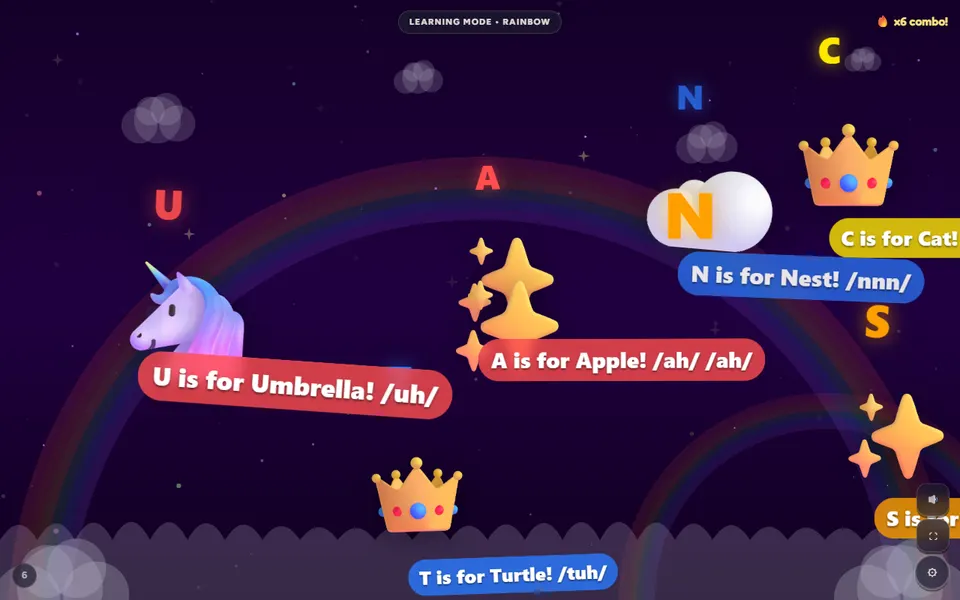
What happens when they press a key?
That depends on the age mode. Pick the one that fits your child, or let them try them all.
| Mode | Best for | Each key press | |
|---|---|---|---|
| 🍼 Baby Mode | 0–2 | Soft colours, slow shapes and gentle sounds | Play |
| 🎈 Toddler Mode | 2–4 | Animals, balloons, rainbows and brighter reactions | Play |
| ✏️ Learning Mode | 4–6 | The letter with a word and its sound (“A is for Apple”), numbers with that many pictures | Play |
| 🎵 Music | Any age | A musical note, so different keys make a tune | Play |
Why use your real keyboard as a toddler keyboard?
- It's what they want anyway. Toddlers copy what grown-ups do. Giving them the real keyboard, with a game that reacts, beats a toy that only looks like one.
- Early typing, the fun way. Toddler typing starts with finding keys and seeing what they do. In Learning Mode, every letter they press comes with its word and sound.
- Big, safe reactions. No ads, no links out of the play area, and settings behind a ⚙ button you hold for three seconds.
- Nothing to buy. No special baby keyboard needed. Some parents plug in a cheap spare USB keyboard so little hands stay off the laptop, but it's optional.
Setting up a keyboard for kids in a minute
- Open Little Keys and press Open the kids keyboard, or use Choose a mode on the home page to pick age, world and play mode first.
- Hand it over. During play, most browser shortcuts are caught so random key combinations don't fire.
- Want more protection? Hold ⚙ for three seconds and turn on the keyboard lock. It goes full screen and, in Chrome and Edge, can hold shortcuts such as closing the tab. Press Esc five times to unlock.
- Adjust as you go. Turn sound down or off, try Gentle or Night mode, or set a play timer.
No keyboard? On tablets and phones every tap works like a key press. The free Little Taps app for iPhone and iPad and Android is built around tapping and works offline.
Keyboard games for kids to try
Keyboard smash
Let them bash as many keys as they like. Every press bursts into something new.
Keyboard smash game →11 toddler worlds
Space, Dinosaur, Farm, Underwater and more, each with its own characters.
See all toddler games →Word Racer (7–9)
For older kids: hear a word, then steer into its letters in order to spell it.
Play Word Racer →Kids keyboard questions
What is an online kids keyboard?
A website that turns your normal computer keyboard into a toy. Little Keys reacts to every key with colours, shapes and sounds for babies and toddlers, and shows letters with words and phonics for 4–6 year olds.
Do I need to buy a special keyboard for kids?
No. Little Keys works with the keyboard you already have, on a laptop or desktop, and with a tap on tablets and phones. Some parents like a cheap spare USB keyboard so little hands aren't on the laptop, but it isn't needed.
Can it help my child learn letters?
Learning Mode (4–6) shows each letter with a word and its sound as children type, such as “A is for Apple”, and numbers with that many pictures. Toddler and Baby Mode focus on colours, characters and sounds instead.
Will my child close the browser by accident?
During play, Little Keys catches key presses so most browser shortcuts don't fire. Lock mode also goes full screen and, in Chrome and Edge, can hold shortcuts such as closing the tab; press Esc five times to unlock. A web page cannot block every system shortcut, so stay nearby.
Is the kids keyboard free?
Yes. There are no ads, no sign-up and nothing to buy.
Their first keyboard is already on your desk
Free, no ads, no sign-up. Works on computers, tablets and phones.